
NinjaOne SCEP Configuration (Windows) / EAP-TLS
This guide walks through configuring Foxpass SCEP with NinjaOne for Windows certificate enrollment and EAP-TLS Wi-Fi deployment.
Prerequisites
- Foxpass Console access (admin role-level)
- NinjaOne admin access with rights to: Organization Custom Fields, Automation script import, and Agent Policies
- Target devices already enrolled into NinjaOne, specifically devices for testing initial deployment
Step 1: Configure SCEP
Create the SCEP endpoint in Foxpass
-
Open the Foxpass Console SCEP page.
-
Click Create SCEP endpoint.
-
Configure the endpoint:
- Name: Give the endpoint a descriptive name, for example
NinjaOne SCEP. - Verification type:
NoneVerification type applicable to MDM enrollment.
- Authentication type:
Challenge Password - Client Certificate Authority: Use the CA created during the EAP-TLS Initial Setup.
- Name: Give the endpoint a descriptive name, for example
-
Click Create.
Make sure to download your Client CA and Server CA before proceeding.
Create NinjaOne organization custom fields
In NinjaOne, go to:
Administration > Organizations > Organization Custom Fields
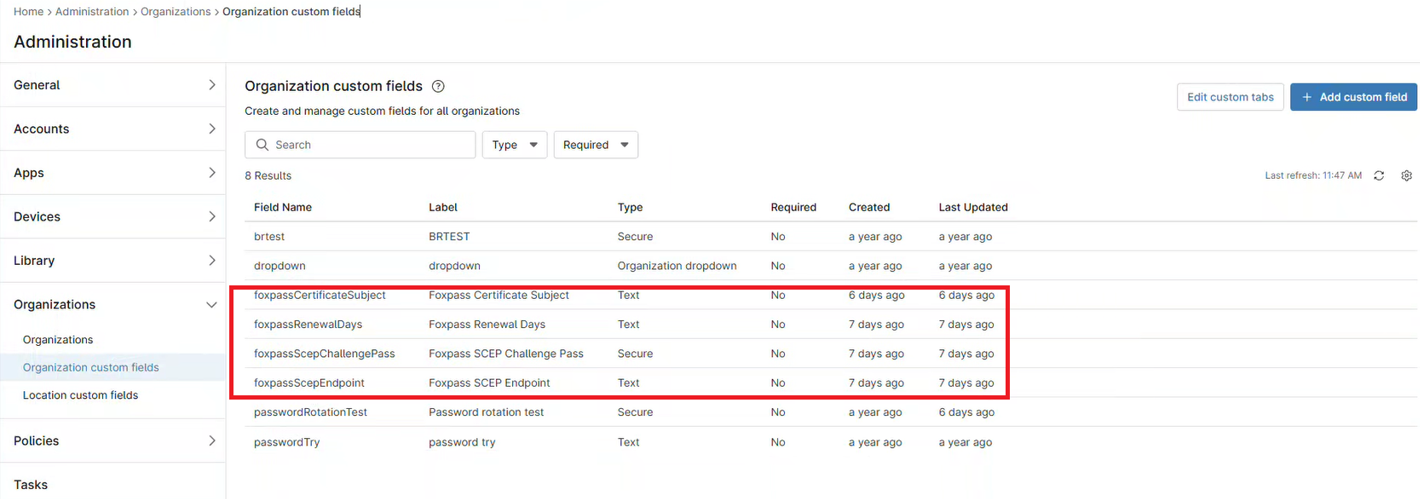
Add the following custom fields:
| Type | Label | Permissions |
|---|---|---|
| Text | Foxpass Certificate Subject | Automations - Read only |
| Text | Foxpass Renewal Days | Automations - Read only |
| Text | Foxpass SCEP Endpoint | Automations - Read only |
| Secure | Foxpass SCEP Challenge Pass | Automations - Read only |
Save each custom field after creating it.
Configure default organization custom field values
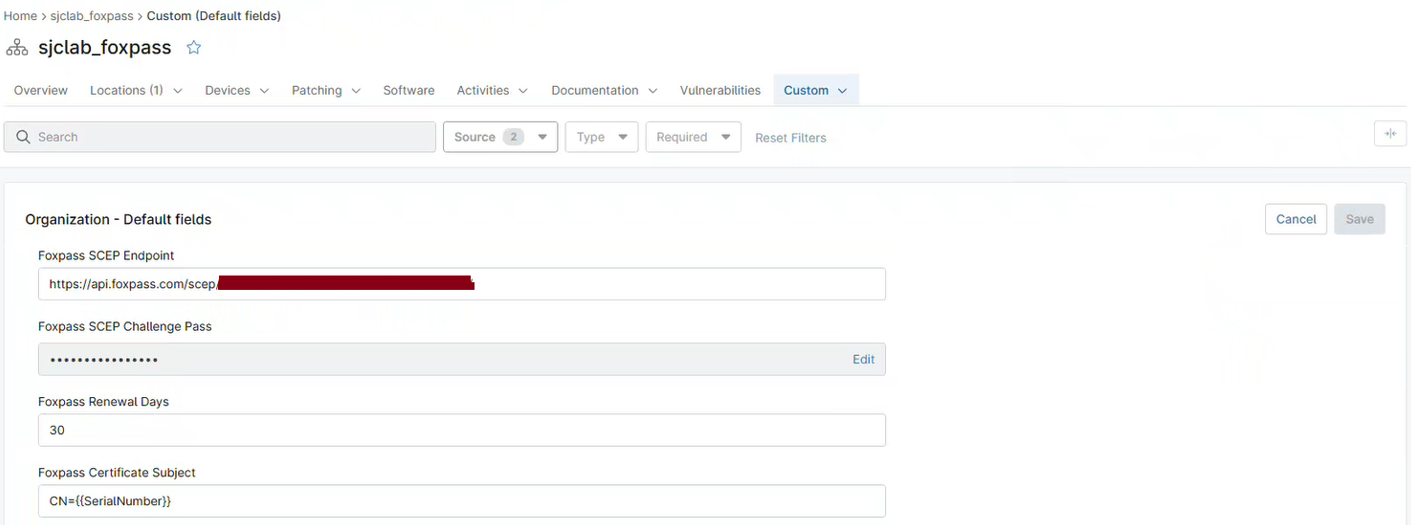
Go to:
Dashboard > Select Organization > Custom > Default Fields
Set the following values:
| Field | Value |
|---|---|
| Foxpass SCEP Endpoint | Insert the SCEP endpoint URL from Step 1 |
| Foxpass SCEP Challenge Pass | Insert the challenge password from Step 1 |
| Foxpass Renewal Days | 30 |
| Foxpass Certificate Subject - Device Certificate | CN={{SerialNumber}} |
Foxpass Renewal Days = certificate renewal when 30 days remaining
Click Save. This will be applicable to SCEP Enrollment in Step 2, Script 2.
Step 2: Import and Configure Scripts
In NinjaOne, go to:
Administration > Automation > Import from File
Copy and import the three PowerShell scripts described below.
Script 1: Trust CA PEM Certificate
Copy and configure the script as follows:
| Setting | Value |
|---|---|
| Name | Foxpass - Trust CA PEM Certificate |
| Language | PowerShell |
| OS | Windows |
| Architecture | All |
| Run as | System |
Within the script, replace two values with the appropriate CA certificate PEM content.
To retrieve each certificate PEM:
- Locate the Client CA and Server CA certificate files.
- Right-click each certificate.
- Open the certificate with Notepad.
- Copy the PEM certificate content.
- Insert the corresponding PEM content into the script.
Replace:
INSERT_CLIENT_CA_PEM
INSERT_SERVER_CA_PEM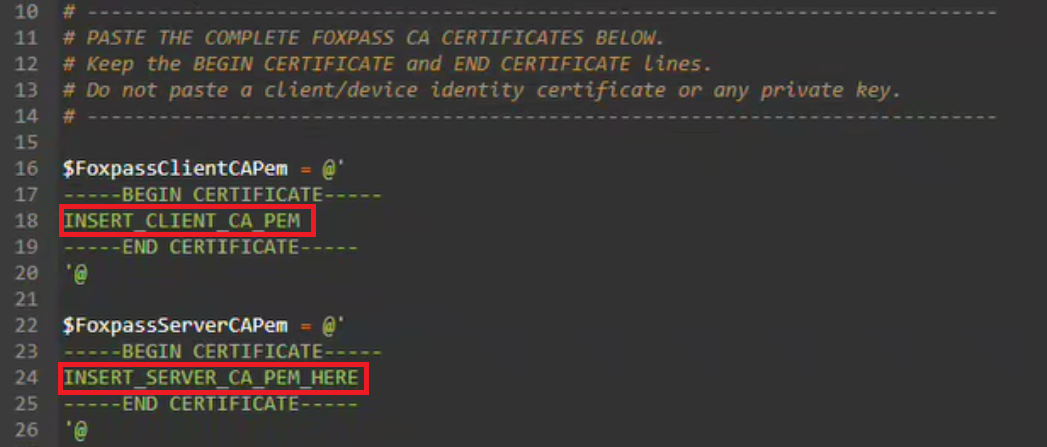
[CmdletBinding()]
param(
    [Parameter(Mandatory = $false)]
    [string]$LogPath = 'C:\ProgramData\NinjaRMMAgent\logs\foxpass-ca-deployment.log'
)

Set-StrictMode -Version 2.0
$ErrorActionPreference = 'Stop'

# -----------------------------------------------------------------------------
# PASTE THE COMPLETE FOXPASS CA CERTIFICATES BELOW.
# Keep the BEGIN CERTIFICATE and END CERTIFICATE lines.
# Do not paste a client/device identity certificate or any private key.
# -----------------------------------------------------------------------------

$FoxpassClientCAPem = @'
-----BEGIN CERTIFICATE-----
INSERT_CLIENT_CA_PEM_HERE
-----END CERTIFICATE-----
'@

$FoxpassServerCAPem = @'
-----BEGIN CERTIFICATE-----
INSERT_SERVER_CA_PEM_HERE
-----END CERTIFICATE-----
'@

# -----------------------------------------------------------------------------

function Initialize-Log {
    $directory = Split-Path -Parent $script:LogPath
    if ([string]::IsNullOrWhiteSpace($directory)) {
        throw "The log path '$script:LogPath' does not include a valid parent directory."
    }

    if (-not (Test-Path -LiteralPath $directory)) {
        New-Item -Path $directory -ItemType Directory -Force | Out-Null
    }
}

function Write-Log {
    param(
        [Parameter(Mandatory = $true)]
        [string]$Message,

        [Parameter(Mandatory = $false)]
        [ValidateSet('INFO', 'WARN', 'ERROR')]
        [string]$Level = 'INFO'
    )

    $entry = '{0} [{1}] {2}' -f (Get-Date -Format 'yyyy-MM-dd HH:mm:ss'), $Level, $Message
    Write-Host $entry

    try {
        Add-Content -LiteralPath $script:LogPath -Value $entry -Encoding UTF8
    }
    catch {
        Write-Host "Unable to write to log file '$script:LogPath': $($_.Exception.Message)"
    }
}

function Test-IsElevated {
    $identity = [Security.Principal.WindowsIdentity]::GetCurrent()
    $principal = New-Object Security.Principal.WindowsPrincipal($identity)
    return $principal.IsInRole([Security.Principal.WindowsBuiltInRole]::Administrator)
}

function Test-PlaceholderPem {
    param(
        [Parameter(Mandatory = $true)]
        [string]$PemText,

        [Parameter(Mandatory = $true)]
        [string]$FriendlyName
    )

    if ([string]::IsNullOrWhiteSpace($PemText) -or
        $PemText -match 'PASTE_COMPLETE_' -or
        $PemText -notmatch '-----BEGIN CERTIFICATE-----' -or
        $PemText -notmatch '-----END CERTIFICATE-----') {
        throw "$FriendlyName has not been populated. Paste the complete PEM certificate into the matching block near the top of the script."
    }
}

function Get-CertificatesFromPem {
    param(
        [Parameter(Mandatory = $true)]
        [string]$PemText,

        [Parameter(Mandatory = $true)]
        [string]$SourceName
    )

    $matches = [regex]::Matches(
        $PemText,
        '-----BEGIN CERTIFICATE-----\s*(?<Data>[A-Za-z0-9+/=\r\n\t ]+?)\s*-----END CERTIFICATE-----',
        [System.Text.RegularExpressions.RegexOptions]::IgnoreCase
    )

    if ($matches.Count -eq 0) {
        throw "No valid PEM certificate blocks were found in $SourceName."
    }

    $certificates = New-Object System.Collections.Generic.List[System.Security.Cryptography.X509Certificates.X509Certificate2]

    foreach ($match in $matches) {
        try {
            $base64 = $match.Groups['Data'].Value -replace '\s', ''
            $rawData = [Convert]::FromBase64String($base64)
            $certificate = New-Object System.Security.Cryptography.X509Certificates.X509Certificate2 -ArgumentList @(,$rawData)
            $certificates.Add($certificate)
        }
        catch {
            throw "A certificate in $SourceName could not be parsed. $($_.Exception.Message)"
        }
    }

    return $certificates
}

function Test-IsCertificateAuthority {
    param(
        [Parameter(Mandatory = $true)]
        [System.Security.Cryptography.X509Certificates.X509Certificate2]$Certificate
    )

    foreach ($extension in $Certificate.Extensions) {
        if ($extension.Oid.Value -eq '2.5.29.19') {
            $basicConstraints = New-Object System.Security.Cryptography.X509Certificates.X509BasicConstraintsExtension
            $basicConstraints.CopyFrom($extension)
            return $basicConstraints.CertificateAuthority
        }
    }

    return $false
}

function Install-CACertificate {
    param(
        [Parameter(Mandatory = $true)]
        [System.Security.Cryptography.X509Certificates.X509Certificate2]$Certificate,

        [Parameter(Mandatory = $true)]
        [string]$SourceName
    )

    if (-not (Test-IsCertificateAuthority -Certificate $Certificate)) {
        throw "Certificate '$($Certificate.Subject)' from $SourceName is not marked as a CA certificate. It was not installed."
    }

    $isSelfSigned = ($Certificate.Subject -eq $Certificate.Issuer)
    $storeName = if ($isSelfSigned) {
        [System.Security.Cryptography.X509Certificates.StoreName]::Root
    }
    else {
        [System.Security.Cryptography.X509Certificates.StoreName]::CertificateAuthority
    }
    $storeDisplay = if ($isSelfSigned) { 'Cert:\LocalMachine\Root' } else { 'Cert:\LocalMachine\CA' }

    $store = New-Object System.Security.Cryptography.X509Certificates.X509Store(
        $storeName,
        [System.Security.Cryptography.X509Certificates.StoreLocation]::LocalMachine
    )

    try {
        $store.Open([System.Security.Cryptography.X509Certificates.OpenFlags]::ReadWrite)
        $existing = $store.Certificates.Find(
            [System.Security.Cryptography.X509Certificates.X509FindType]::FindByThumbprint,
            $Certificate.Thumbprint,
            $false
        )

        if ($existing.Count -gt 0) {
            Write-Log "Already installed: '$($Certificate.Subject)' [$($Certificate.Thumbprint)] in $storeDisplay."
            return 'Existing'
        }

        $store.Add($Certificate)
        Write-Log "Installed: '$($Certificate.Subject)' [$($Certificate.Thumbprint)] from $SourceName into $storeDisplay."
        return 'Installed'
    }
    finally {
        $store.Close()
    }
}

try {
    $script:LogPath = $LogPath
    Initialize-Log
    Write-Log 'Starting Foxpass CA certificate deployment.'

    if (-not (Test-IsElevated)) {
        throw 'This script must run as SYSTEM or from an elevated PowerShell session.'
    }

    Test-PlaceholderPem -PemText $FoxpassClientCAPem -FriendlyName 'Foxpass Client CA'
    Test-PlaceholderPem -PemText $FoxpassServerCAPem -FriendlyName 'Foxpass Server CA'

    $inputSets = @(
        [pscustomobject]@{ Name = 'Foxpass Client CA'; Pem = $FoxpassClientCAPem },
        [pscustomobject]@{ Name = 'Foxpass Server CA'; Pem = $FoxpassServerCAPem }
    )

    $seenThumbprints = @{}
    $installedCount = 0
    $existingCount = 0

    foreach ($inputSet in $inputSets) {
        $certificates = @(Get-CertificatesFromPem -PemText $inputSet.Pem -SourceName $inputSet.Name)
        Write-Log "Found $(@($certificates).Count) certificate(s) in $($inputSet.Name)."

        foreach ($certificate in @($certificates)) {
            try {
                if ($seenThumbprints.ContainsKey($certificate.Thumbprint)) {
                    Write-Log "Duplicate PEM input skipped: '$($certificate.Subject)' [$($certificate.Thumbprint)]." -Level 'WARN'
                    continue
                }

                $seenThumbprints[$certificate.Thumbprint] = $true
                $result = Install-CACertificate -Certificate $certificate -SourceName $inputSet.Name

                if ($result -eq 'Installed') { $installedCount++ }
                if ($result -eq 'Existing') { $existingCount++ }
            }
            finally {
                $certificate.Dispose()
            }
        }
    }

    Write-Log "Foxpass CA deployment completed successfully. Installed: $installedCount; already present: $existingCount."
    exit 0
}
catch {
    try {
        Write-Log $_.Exception.Message -Level 'ERROR'
        Write-Log 'Foxpass CA deployment failed.' -Level 'ERROR'
    }
    catch {
        Write-Host "Foxpass CA deployment failed: $($_.Exception.Message)"
    }
    exit 1
}
Then click Save.
Script 2: SCEP Certificate Enrollment
Device/Machine Certificate
SCEP values were configured in Step 1.
| Setting | Value |
|---|---|
| Name | Foxpass - SCEP Device Certificate Enrollment |
| Language | PowerShell |
| OS | Windows |
| Architecture | All |
| Run as | System |
Copy and paste. No changes.
[CmdletBinding()]
param(
    [string]$FoxpassScepEndpoint,
    [string]$FoxpassScepChallengePass,
    [string]$CertificateSubject,
    [ValidateRange(1,3650)][int]$RenewalDays = 30,
    [ValidateSet(2048,4096)][int]$KeyLength = 4096,
    [bool]$CleanupSupersededCertificates = $true,
    [string]$FriendlyName = 'Foxpass EAP-TLS Device Certificate',
    [string]$LogPath = 'C:\ProgramData\Foxpass\Logs\Enroll-FoxpassSCEP.log'
)
Set-StrictMode -Version 2.0
$ErrorActionPreference = 'Stop'
$ProgressPreference = 'SilentlyContinue'
$ClientAuthOid = '1.3.6.1.5.5.7.3.2'
$Sha256Oid = '2.16.840.1.101.3.4.2.1'
$StorePath = 'Cert:\LocalMachine\My'

function Write-Log {
    param([string]$Message,[ValidateSet('INFO','WARN','ERROR')][string]$Level='INFO')
    $dir = Split-Path -Parent $LogPath
    if (-not (Test-Path $dir)) { New-Item $dir -ItemType Directory -Force | Out-Null }
    $line = '{0} [{1}] {2}' -f (Get-Date -Format 'yyyy-MM-dd HH:mm:ss'),$Level,$Message
    Write-Host $line
    Add-Content $LogPath $line -Encoding UTF8
}

function ConvertTo-Text {
    param([AllowNull()][object]$Value)
    if ($null -eq $Value) { return $null }
    if ($Value -is [Security.SecureString]) {
        $ptr = [Runtime.InteropServices.Marshal]::SecureStringToBSTR($Value)
        try { $Value = [Runtime.InteropServices.Marshal]::PtrToStringBSTR($ptr) }
        finally { if ($ptr -ne [IntPtr]::Zero) { [Runtime.InteropServices.Marshal]::ZeroFreeBSTR($ptr) } }
    }
    if ($Value -is [Array]) {
        $Value = @($Value | ForEach-Object { ConvertTo-Text $_ } | Where-Object { $_ }) -join [Environment]::NewLine
    }
    $text = [Convert]::ToString($Value,[Globalization.CultureInfo]::InvariantCulture).Trim()
    if (-not $text) { return $null }
    if ($text.StartsWith('{') -and $text.EndsWith('}')) {
        try {
            $json = $text | ConvertFrom-Json -ErrorAction Stop
            foreach ($name in 'value','Value','text','Text','url','Url','href','Href') {
                $property = $json.PSObject.Properties[$name]
                if ($property -and ($candidate = ConvertTo-Text $property.Value)) { return $candidate }
            }
        } catch {}
    }
    return $text
}

function Get-NinjaValue {
    param([string]$Name)
    foreach ($cmd in 'Ninja-Property-Get','Get-NinjaProperty') {
        if (-not (Get-Command $cmd -ErrorAction SilentlyContinue)) { continue }
        try {
            $value = if ($cmd -eq 'Get-NinjaProperty') { Get-NinjaProperty -Name $Name } else { Ninja-Property-Get $Name }
            if ($value = ConvertTo-Text $value) { return $value }
        } catch {}
    }
}

function Resolve-Value {
    param([AllowNull()][object]$Explicit,[string]$EnvironmentName,[string]$NinjaField,[switch]$Required)
    $value = ConvertTo-Text $Explicit
    if (-not $value) { $value = ConvertTo-Text ([Environment]::GetEnvironmentVariable($EnvironmentName,'Process')) }
    if (-not $value) { $value = Get-NinjaValue $NinjaField }
    if ($Required -and -not $value) { throw "Missing '$NinjaField'. Supply it as a parameter, script variable, or NinjaOne custom field." }
    return $value
}

function Get-ClientAuthOids {
    param([Security.Cryptography.X509Certificates.X509Certificate2]$Certificate)
    $ext = $Certificate.Extensions | Where-Object { $_.Oid.Value -eq '2.5.29.37' } | Select-Object -First 1
    if (-not $ext) { return @() }
    try {
        $eku = New-Object Security.Cryptography.X509Certificates.X509EnhancedKeyUsageExtension
        $eku.CopyFrom($ext)
        return @($eku.EnhancedKeyUsages | ForEach-Object Value)
    } catch {
        return @($Certificate.EnhancedKeyUsageList | ForEach-Object {
            if ($_.ObjectId -is [string]) { $_.ObjectId } elseif ($_.ObjectId) { $_.ObjectId.Value }
        })
    }
}

function Get-MatchingCertificates {
    param([string]$Subject)
    @(Get-ChildItem $StorePath | Where-Object {
        $_.Subject -ieq $Subject -and $_.HasPrivateKey -and ((Get-ClientAuthOids $_) -contains $ClientAuthOid)
    })
}

function New-ScepRequest {
    param([string]$Subject,[string]$Challenge,[int]$Length)
    $request = New-Object -ComObject X509Enrollment.CX509CertificateRequestPkcs10
    $request.Initialize(2)
    $dn = New-Object -ComObject X509Enrollment.CX500DistinguishedName
    $dn.Encode($Subject)
    $request.Subject = $dn
    $request.PrivateKey.Length = $Length
    $request.PrivateKey.ExportPolicy = 0
    $request.PrivateKey.ProviderName = 'Microsoft Software Key Storage Provider'
    $request.KeyContainerNamePrefix = "FoxpassSCEP-$($env:COMPUTERNAME)-"
    $request.ChallengePassword = $Challenge
    $hash = New-Object -ComObject X509Enrollment.CObjectId
    $hash.InitializeFromValue($Sha256Oid)
    $request.HashAlgorithm = $hash
    $keyUsage = New-Object -ComObject X509Enrollment.CX509ExtensionKeyUsage
    $keyUsage.InitializeEncode(0xA0)
    $request.X509Extensions.Add($keyUsage)
    $oids = New-Object -ComObject X509Enrollment.CObjectIds
    $oid = New-Object -ComObject X509Enrollment.CObjectId
    $oid.InitializeFromValue($ClientAuthOid)
    $oids.Add($oid)
    $eku = New-Object -ComObject X509Enrollment.CX509ExtensionEnhancedKeyUsage
    $eku.InitializeEncode($oids)
    $request.X509Extensions.Add($eku)
    return $request
}

function Invoke-ScepEnrollment {
    param([string]$Endpoint,[__ComObject]$Request)
    $helper = New-Object -ComObject X509Enrollment.CX509SCEPEnrollmentHelper
    $helper.Initialize($Endpoint,[string]::Empty,$Request,[string]::Empty)
    $result = [int]$helper.Enroll(0)
    if ($result -eq 0) { return }
    $message = [string]$helper.ResultMessageText
    switch ($result) {
        2 { throw "Foxpass rejected the request. $message" }
        3 { throw "Foxpass returned a pending response. $message" }
        11 { throw "Foxpass requested another challenge. $message" }
        default { throw "Unexpected SCEP disposition '$result'. $message" }
    }
}

try {
    $identity = [Security.Principal.WindowsIdentity]::GetCurrent()
    if (-not (($identity.User -and $identity.User.Value -eq 'S-1-5-18') -or $identity.Name -eq 'NT AUTHORITY\SYSTEM')) {
        throw 'Run this NinjaOne automation as NT AUTHORITY\SYSTEM.'
    }

    $FoxpassScepEndpoint = Resolve-Value $FoxpassScepEndpoint 'FoxpassScepEndpoint' 'foxpassScepEndpoint' -Required
    $endpointMatch = [regex]::Match([Net.WebUtility]::HtmlDecode($FoxpassScepEndpoint),'https://api\.foxpass\.com/scep/[A-Za-z0-9-]+/?','IgnoreCase')
    if ($endpointMatch.Success) { $FoxpassScepEndpoint = $endpointMatch.Value }
    $uri = $null
    if (-not [Uri]::TryCreate($FoxpassScepEndpoint,[UriKind]::Absolute,[ref]$uri) -or $uri.Scheme -ne 'https') { throw 'Invalid Foxpass SCEP HTTPS endpoint.' }
    $FoxpassScepEndpoint = $uri.AbsoluteUri

    $FoxpassScepChallengePass = [Net.WebUtility]::HtmlDecode((Resolve-Value $FoxpassScepChallengePass 'FoxpassScepChallengePass' 'foxpassScepChallengePass' -Required))
    $FoxpassScepChallengePass = ($FoxpassScepChallengePass -replace '[\uFEFF\u200B-\u200D\u2060\x00-\x1F\x7F]','').Trim().Trim([char[]]@([char]34,[char]39))
    if (-not $FoxpassScepChallengePass -or $FoxpassScepChallengePass -match '[^\x20-\x7E]') { throw 'Invalid Foxpass SCEP challenge.' }

    $serial = ConvertTo-Text (Get-CimInstance Win32_BIOS -ErrorAction Stop).SerialNumber
    if (-not $serial -or $serial -in @('Default String','System Serial Number','To Be Filled By O.E.M.','To Be Filled By OEM','Unknown','None','Not Specified','Not Applicable')) { throw "Invalid BIOS serial number: '$serial'." }
    $serial = ($serial -replace '[\uFEFF\u200B-\u200D\u2060\x00-\x1F\x7F]','' -replace '\\','\\' -replace '([,+"<>;=])','\$1').Trim()

    if (-not $CertificateSubject) { $CertificateSubject = Resolve-Value $null 'FoxpassCertificateSubject' 'foxpassCertificateSubject' }
    if (-not $CertificateSubject) { $CertificateSubject = "CN=$serial" }
    else {
        foreach ($token in '{{SerialNumber}}','{{SERIALNUMBER}}','%SERIALNUMBER%','$serialNumber') { $CertificateSubject = $CertificateSubject.Replace($token,$serial) }
        if ($CertificateSubject -notmatch '^\s*[A-Za-z][A-Za-z0-9.]*\s*=') { $CertificateSubject = "CN=$CertificateSubject" }
    }

    if ($raw = Resolve-Value $null 'FoxpassRenewalDays' 'foxpassRenewalDays') {
        $parsed = 0
        if (-not [int]::TryParse($raw,[ref]$parsed) -or $parsed -lt 1 -or $parsed -gt 3650) { throw 'foxpassRenewalDays must be 1-3650.' }
        $RenewalDays = $parsed
    }

    $existing = Get-MatchingCertificates $CertificateSubject | Where-Object { $_.NotBefore -le (Get-Date) -and $_.NotAfter -gt (Get-Date) } | Sort-Object NotAfter -Descending | Select-Object -First 1
    if ($existing -and $existing.NotAfter -gt (Get-Date).AddDays($RenewalDays)) {
        Write-Log "Certificate valid until $($existing.NotAfter.ToString('u')); no renewal needed."
        exit 0
    }

    Write-Log "Enrolling $CertificateSubject."
    $before = @(Get-ChildItem $StorePath | ForEach-Object Thumbprint)
    $request = New-ScepRequest $CertificateSubject $FoxpassScepChallengePass $KeyLength
    Invoke-ScepEnrollment $FoxpassScepEndpoint $request
    $FoxpassScepChallengePass = $null

    $newCertificate = $null
    for ($i=0; $i -lt 5 -and -not $newCertificate; $i++) {
        Start-Sleep 2
        $newCertificate = Get-MatchingCertificates $CertificateSubject | Where-Object { $before -notcontains $_.Thumbprint } | Sort-Object NotAfter -Descending | Select-Object -First 1
    }
    if (-not $newCertificate) { throw 'SCEP completed, but no usable new client-authentication certificate was found.' }

    try { $newCertificate.FriendlyName = $FriendlyName } catch { Write-Log 'Certificate installed; friendly name could not be set.' 'WARN' }
    if ($CleanupSupersededCertificates) {
        Get-MatchingCertificates $CertificateSubject | Where-Object {
            $_.Thumbprint -ne $newCertificate.Thumbprint -and $_.NotAfter -le $newCertificate.NotAfter
        } | ForEach-Object {
            try { Remove-Item (Join-Path $StorePath $_.Thumbprint) -Force } catch { Write-Log "Could not remove old certificate $($_.Thumbprint)." 'WARN' }
        }
    }

    Write-Log "Enrollment complete: $($newCertificate.Thumbprint), expires $($newCertificate.NotAfter.ToString('u'))."
    exit 0
}
catch {
    Write-Log $_.Exception.Message 'ERROR'
    exit 1
}
finally {
    $FoxpassScepChallengePass = $null
    $request = $null
}
Click Save.
Script 3: Wi-Fi Profile Configuration
Copy and configure the script as follows:
| Setting | Value |
|---|---|
| Name | Foxpass - Wi-Fi Profile Configuration - SSID |
| Language | PowerShell |
| OS | Windows |
| Architecture | All |
| Run as | System |
Within the script, replace two values.

1. SSID
Replace:
$Ssid = 'INSERT_SSID_HERE'Note: The SSID value is case-sensitive.
2. Server CA thumbprint
Replace:
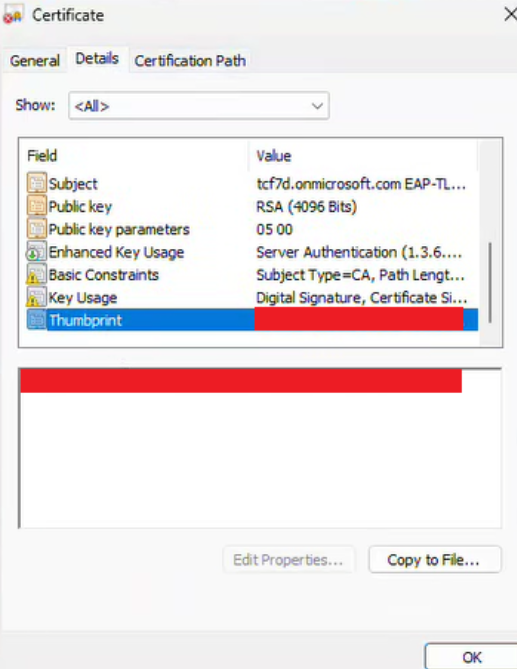
[string]$ServerCaThumbprint = 'INSERT_SERVER_CA_THUMBPRINT_HERE'To retrieve the thumbprint, open the Server CA Certificate, go to Details, and copy the Thumbprint value.
[CmdletBinding()]
param(
    # -------------------------------------------------------------------------
    # REQUIRED: Replace the two INSERT values below before deploying.
    # -------------------------------------------------------------------------
    [string]$Ssid = 'INSERT_SSID_HERE',
    [string]$ServerCaThumbprint = 'INSERT_SERVER_CA_THUMBPRINT_HERE',
    # -------------------------------------------------------------------------

    [AllowEmptyString()]
    [string]$RadiusServerNames = '',
    [ValidateRange(10,300)]
    [int]$ConnectionWaitSeconds = 60,
    [switch]$RequireImmediateConnection,
    [string]$LogPath = "C:\ProgramData\Foxpass\Logs\Configure-$Ssid-EAPTLS.log"
)

Set-StrictMode -Version 2.0
$ErrorActionPreference = 'Stop'
$ProgressPreference = 'SilentlyContinue'

$ClientAuthenticationOid = '1.3.6.1.5.5.7.3.2'

function Initialize-Log {
    $dir = Split-Path -Parent $LogPath
    if (-not (Test-Path -LiteralPath $dir)) {
        New-Item -Path $dir -ItemType Directory -Force | Out-Null
    }
}

function Write-Log {
    param(
        [Parameter(Mandatory)][string]$Message,
        [ValidateSet('INFO','WARN','ERROR')][string]$Level='INFO'
    )

    $entry = '{0} [{1}] {2}' -f (Get-Date -Format 'yyyy-MM-dd HH:mm:ss'), $Level, $Message
    Write-Host $entry
    Add-Content -LiteralPath $LogPath -Value $entry -Encoding UTF8
}

function ConvertTo-PlainString {
    param([AllowNull()][object]$Value)

    if ($null -eq $Value) { return $null }

    if ($Value -is [Security.SecureString]) {
        $bstr = [Runtime.InteropServices.Marshal]::SecureStringToBSTR($Value)
        try { $Value = [Runtime.InteropServices.Marshal]::PtrToStringBSTR($bstr) }
        finally {
            if ($bstr -ne [IntPtr]::Zero) {
                [Runtime.InteropServices.Marshal]::ZeroFreeBSTR($bstr)
            }
        }
    }

    if ($Value -is [System.Array]) {
        $parts = @(
            $Value |
                ForEach-Object { ConvertTo-PlainString -Value $_ } |
                Where-Object { -not [string]::IsNullOrWhiteSpace($_) }
        )
        if ($parts.Count -eq 0) { return $null }
        return ($parts -join ';').Trim()
    }

    $text = [string]$Value
    if ([string]::IsNullOrWhiteSpace($text)) { return $null }

    $text = $text.Trim()

    # NinjaOne URL/text fields can occasionally be returned as a JSON wrapper.
    if ($text.StartsWith('{') -and $text.EndsWith('}')) {
        try {
            $obj = $text | ConvertFrom-Json -ErrorAction Stop
            foreach ($propertyName in @('value','text','url','href')) {
                $property = $obj.PSObject.Properties[$propertyName]
                if ($null -ne $property) {
                    $candidate = ConvertTo-PlainString -Value $property.Value
                    if (-not [string]::IsNullOrWhiteSpace($candidate)) {
                        return $candidate
                    }
                }
            }
        }
        catch { }
    }

    return $text
}

function Get-NinjaFieldValue {
    param([Parameter(Mandatory)][string]$Name)

    # Prefer the command that is present in the NinjaOne agent scripting host.
    $legacyCommand = Get-Command -Name 'Ninja-Property-Get' -ErrorAction SilentlyContinue
    if ($legacyCommand) {
        try {
            $result = Ninja-Property-Get $Name
            $value = ConvertTo-PlainString -Value $result
            if (-not [string]::IsNullOrWhiteSpace($value)) { return $value }
        }
        catch {
            Write-Log "Ninja field '$Name' unavailable." 'WARN'
        }
    }

    $newCommand = Get-Command -Name 'Get-NinjaProperty' -ErrorAction SilentlyContinue
    if ($newCommand) {
        try {
            $result = Get-NinjaProperty -Name $Name
            $value = ConvertTo-PlainString -Value $result
            if (-not [string]::IsNullOrWhiteSpace($value)) { return $value }
        }
        catch {
            Write-Log "Ninja field '$Name' unavailable." 'WARN'
        }
    }

    return $null
}

function Resolve-Value {
    param(
        [string]$Explicit,
        [string]$EnvironmentVariable,
        [string]$FieldName,
        [string]$DisplayName
    )

    $explicitValue = ConvertTo-PlainString -Value $Explicit
    if (-not [string]::IsNullOrWhiteSpace($explicitValue)) {
        # Explicit parameter supplied; no additional log entry needed.
        return $explicitValue
    }

    # NinjaOne script variables are commonly exposed as process environment variables.
    $environmentValue = ConvertTo-PlainString -Value (
        [Environment]::GetEnvironmentVariable($EnvironmentVariable, 'Process')
    )
    if (-not [string]::IsNullOrWhiteSpace($environmentValue)) {
        Write-Log "Using Ninja variable '$EnvironmentVariable'."
        return $environmentValue
    }

    $fieldValue = Get-NinjaFieldValue -Name $FieldName
    if (-not [string]::IsNullOrWhiteSpace($fieldValue)) {
        Write-Log "Using Ninja field '$FieldName'."
        return $fieldValue
    }

    throw "$DisplayName is required. Supply parameter '-$EnvironmentVariable', map a NinjaOne script variable named '$EnvironmentVariable', or create an organization custom field with internal name '$FieldName' and grant Automation read access."
}

function Normalize-Thumbprint {
    param([Parameter(Mandatory)][string]$Thumbprint)
    $value = ($Thumbprint -replace '[^0-9A-Fa-f]','').ToUpperInvariant()
    if ($value.Length -ne 40) { throw 'Server CA thumbprint must be a 40-character SHA-1 certificate thumbprint.' }
    return $value
}

function Test-IsAdministrator {
    $identity = [Security.Principal.WindowsIdentity]::GetCurrent()
    $principal = New-Object Security.Principal.WindowsPrincipal($identity)
    return $principal.IsInRole([Security.Principal.WindowsBuiltInRole]::Administrator)
}

function Test-ClientAuthenticationEku {
    [CmdletBinding()]
    param(
        [Parameter(Mandatory)]
        [Security.Cryptography.X509Certificates.X509Certificate2]$Certificate
    )

    # PowerShell exposes EnhancedKeyUsageList differently across Windows and
    # .NET versions. In some environments ObjectId is already a string; in
    # others it is an Oid object. Parse both forms and then fall back to the
    # certificate's EKU extension directly.
    try {
        foreach ($usage in @($Certificate.EnhancedKeyUsageList)) {
            if ($null -eq $usage) { continue }

            $oid = $null

            if ($usage.PSObject.Properties.Name -contains 'ObjectId') {
                $objectId = $usage.ObjectId

                if ($objectId -is [string]) {
                    $oid = $objectId
                }
                elseif ($null -ne $objectId -and
                        $objectId.PSObject.Properties.Name -contains 'Value') {
                    $oid = [string]$objectId.Value
                }
            }

            if ([string]::IsNullOrWhiteSpace($oid) -and
                $usage -is [Security.Cryptography.Oid]) {
                $oid = [string]$usage.Value
            }

            if ($oid -eq $ClientAuthenticationOid) {
                return $true
            }
        }
    }
    catch {
        # Fall back to parsing the EKU extension.
    }

    try {
        $ekuExtension = $Certificate.Extensions |
            Where-Object { $_.Oid.Value -eq '2.5.29.37' } |
            Select-Object -First 1

        if ($null -eq $ekuExtension) {
            return $false
        }

        $typedEku = New-Object -TypeName Security.Cryptography.X509Certificates.X509EnhancedKeyUsageExtension -ArgumentList @($ekuExtension, $ekuExtension.Critical)

        foreach ($oid in @($typedEku.EnhancedKeyUsages)) {
            if ($null -ne $oid -and [string]$oid.Value -eq $ClientAuthenticationOid) {
                return $true
            }
        }
    }
    catch {
        # Treat an unreadable EKU extension as not matching.
    }

    return $false
}

function Escape-XmlText {
    param(
        [Parameter()]
        [AllowNull()]
        [AllowEmptyString()]
        [string]$Text
    )

    if ([string]::IsNullOrEmpty($Text)) {
        return ''
    }

    return [Security.SecurityElement]::Escape($Text)
}

Initialize-Log
Write-Log "Deploying EAP-TLS profile for '$Ssid'."

try {
    if (-not (Test-IsAdministrator)) { throw 'This script must run as Administrator or SYSTEM.' }

    # Server-name validation is intentionally optional. An empty value keeps
    # certificate-chain validation enabled while disabling DNS-name matching.
    $RadiusServerNames = ConvertTo-PlainString -Value $RadiusServerNames
    if ([string]::IsNullOrWhiteSpace($RadiusServerNames)) {
        $RadiusServerNames = ''
        Write-Log 'Server-name matching disabled; CA pinning remains enabled.' 'WARN'
    }
    else {
        # Server names supplied explicitly; no additional log entry needed.
    }

    $ServerCaThumbprint = Resolve-Value -Explicit $ServerCaThumbprint -EnvironmentVariable 'ServerCaThumbprint' -FieldName 'foxpassServerCaThumbprint' -DisplayName 'Foxpass Server CA thumbprint'
    $ServerCaThumbprint = Normalize-Thumbprint -Thumbprint $ServerCaThumbprint
    # Windows WLAN XML profiles require the CA thumbprint as space-separated byte pairs.
    $ServerCaThumbprintXml = ($ServerCaThumbprint -replace '(..)', '$1 ').Trim()

    $serverCa = Get-ChildItem Cert:\LocalMachine\Root,Cert:\LocalMachine\CA -ErrorAction SilentlyContinue |
        Where-Object { ($_.Thumbprint -replace '\s','').ToUpperInvariant() -eq $ServerCaThumbprint } |
        Select-Object -First 1
    if (-not $serverCa) { throw "The Foxpass Server CA certificate '$ServerCaThumbprint' is not installed in LocalMachine\Root or LocalMachine\CA." }

    $serial = [string](Get-CimInstance Win32_BIOS -ErrorAction Stop).SerialNumber
    $serial = $serial.Trim()
    $expectedSubject = "CN=$serial"

    $clientCert = Get-ChildItem Cert:\LocalMachine\My |
        Where-Object {
            $_.Subject -eq $expectedSubject -and $_.HasPrivateKey -and $_.NotAfter -gt (Get-Date) -and (Test-ClientAuthenticationEku $_)
        } |
        Sort-Object NotAfter -Descending |
        Select-Object -First 1
    if (-not $clientCert) { throw "No valid machine EAP-TLS certificate with subject '$expectedSubject', private key, and Client Authentication EKU was found." }
    Write-Log "Client certificate ready: $expectedSubject."

    $wlanService = Get-Service -Name WlanSvc -ErrorAction Stop
    if ($wlanService.Status -ne 'Running') {
        Start-Service -Name WlanSvc
        $wlanService.WaitForStatus('Running',[TimeSpan]::FromSeconds(15))
    }

    $interfacesText = (& netsh.exe wlan show interfaces 2>&1 | Out-String)
    if ($LASTEXITCODE -ne 0 -or $interfacesText -match 'There is no wireless interface') {
        throw 'No usable Windows wireless interface was detected.'
    }

    $escapedSsid = Escape-XmlText -Text $Ssid

    $normalizedServerNames = @(
        $RadiusServerNames -split '[,;\r\n]+' |
            ForEach-Object { $_.Trim() } |
            Where-Object { -not [string]::IsNullOrWhiteSpace($_) }
    ) -join ';'

    if ([string]::IsNullOrWhiteSpace($normalizedServerNames)) {
        $escapedServerNames = ''
    }
    else {
        $escapedServerNames = Escape-XmlText -Text $normalizedServerNames
    }

    $profileXml = @"
<?xml version="1.0" encoding="UTF-8"?>
<WLANProfile xmlns="http://www.microsoft.com/networking/WLAN/profile/v1">
  <name>$escapedSsid</name>
  <SSIDConfig><SSID><name>$escapedSsid</name></SSID><nonBroadcast>false</nonBroadcast></SSIDConfig>
  <connectionType>ESS</connectionType>
  <connectionMode>auto</connectionMode>
  <autoSwitch>false</autoSwitch>
  <MSM>
    <security>
      <authEncryption><authentication>WPA2</authentication><encryption>AES</encryption><useOneX>true</useOneX></authEncryption>
      <OneX xmlns="http://www.microsoft.com/networking/OneX/v1">
        <authMode>machine</authMode>
        <EAPConfig>
          <EapHostConfig xmlns="http://www.microsoft.com/provisioning/EapHostConfig" xmlns:eapCommon="http://www.microsoft.com/provisioning/EapCommon" xmlns:baseEap="http://www.microsoft.com/provisioning/BaseEapMethodConfig">
            <EapMethod><eapCommon:Type>13</eapCommon:Type><eapCommon:AuthorId>0</eapCommon:AuthorId></EapMethod>
            <Config xmlns:baseEap="http://www.microsoft.com/provisioning/BaseEapConnectionPropertiesV1" xmlns:eapTls="http://www.microsoft.com/provisioning/EapTlsConnectionPropertiesV1">
              <baseEap:Eap>
                <baseEap:Type>13</baseEap:Type>
                <eapTls:EapType>
                  <eapTls:CredentialsSource><eapTls:CertificateStore><eapTls:SimpleCertSelection>true</eapTls:SimpleCertSelection></eapTls:CertificateStore></eapTls:CredentialsSource>
                  <eapTls:ServerValidation>
                    <eapTls:DisableUserPromptForServerValidation>true</eapTls:DisableUserPromptForServerValidation>
                    <eapTls:ServerNames>$escapedServerNames</eapTls:ServerNames>
                    <eapTls:TrustedRootCA>$ServerCaThumbprintXml</eapTls:TrustedRootCA>
                  </eapTls:ServerValidation>
                  <eapTls:DifferentUsername>false</eapTls:DifferentUsername>
                  <eapTls:PerformServerValidation xmlns:eapTlsV2="http://www.microsoft.com/provisioning/EapTlsConnectionPropertiesV2">true</eapTls:PerformServerValidation>
                  <eapTls:AcceptServerName xmlns:eapTlsV2="http://www.microsoft.com/provisioning/EapTlsConnectionPropertiesV2">false</eapTls:AcceptServerName>
                </eapTls:EapType>
              </baseEap:Eap>
            </Config>
          </EapHostConfig>
        </EAPConfig>
      </OneX>
    </security>
  </MSM>
</WLANProfile>
"@

    # Correct the V2 namespace prefixes generated above.
    $profileXml = $profileXml.Replace('<eapTls:PerformServerValidation xmlns:eapTlsV2=', '<eapTlsV2:PerformServerValidation xmlns:eapTlsV2=')
    $profileXml = $profileXml.Replace('</eapTls:PerformServerValidation>', '</eapTlsV2:PerformServerValidation>')
    $profileXml = $profileXml.Replace('<eapTls:AcceptServerName xmlns:eapTlsV2=', '<eapTlsV2:AcceptServerName xmlns:eapTlsV2=')
    $profileXml = $profileXml.Replace('</eapTls:AcceptServerName>', '</eapTlsV2:AcceptServerName>')

    $tempPath = Join-Path $env:TEMP "$Ssid-EAPTLS.xml"
    try {
        Set-Content -LiteralPath $tempPath -Value $profileXml -Encoding UTF8 -Force
        $addOutput = (& netsh.exe wlan add profile filename="$tempPath" user=all 2>&1 | Out-String).Trim()
        if ($LASTEXITCODE -ne 0) { throw "Windows failed to import the '$Ssid' profile. $addOutput" }
        Write-Log "Profile installed: $Ssid."
    }
    finally { Remove-Item -LiteralPath $tempPath -Force -ErrorAction SilentlyContinue }

    $networks = (& netsh.exe wlan show networks mode=bssid 2>&1 | Out-String)
    if ($networks -notmatch ('(?im)^\s*SSID\s+\d+\s*:\s*' + [regex]::Escape($Ssid) + '\s*$')) {
        Write-Log "SSID not visible; profile will auto-connect later." 'WARN'
        exit 0
    }

    $connectOutput = (& netsh.exe wlan connect name="$Ssid" ssid="$Ssid" 2>&1 | Out-String).Trim()
    if ($LASTEXITCODE -ne 0) { throw "Windows could not start the connection to '$Ssid'. $connectOutput" }
    Write-Log "Connection requested: $Ssid."

    $deadline = (Get-Date).AddSeconds($ConnectionWaitSeconds)
    do {
        Start-Sleep -Seconds 2
        $status = (& netsh.exe wlan show interfaces 2>&1 | Out-String)
        if ($status -match '(?im)^\s*State\s*:\s*connected\s*$' -and $status -match ('(?im)^\s*SSID\s*:\s*' + [regex]::Escape($Ssid) + '\s*$')) {
            Write-Log "Connected: $Ssid."
            exit 0
        }
    } while ((Get-Date) -lt $deadline)

    $finalStatus = (& netsh.exe wlan show interfaces 2>&1 | Out-String).Trim()
    if (-not [string]::IsNullOrWhiteSpace($finalStatus)) {
        Write-Log 'Connection not completed; current WLAN status:' 'WARN'
        foreach ($line in ($finalStatus -split "`r?`n")) {
            if (-not [string]::IsNullOrWhiteSpace($line)) { Write-Log $line.Trim() 'WARN' }
        }
    }

    try {
        $recentWlanEvents = Get-WinEvent -FilterHashtable @{
            LogName   = 'Microsoft-Windows-WLAN-AutoConfig/Operational'
            StartTime = (Get-Date).AddMinutes(-5)
        } -ErrorAction Stop | Select-Object -First 8

        foreach ($event in $recentWlanEvents) {
            $message = ([string]$event.Message -replace "`r|`n", ' ' -replace '\s+', ' ').Trim()
            if ($message.Length -gt 500) { $message = $message.Substring(0,500) + '...' }
            Write-Log ("WLAN {0}: {1}" -f $event.Id,$message) 'WARN'
        }
    }
    catch {
        Write-Log "WLAN diagnostics unavailable: $($_.Exception.Message)" 'WARN'
    }

    if ($RequireImmediateConnection) {
        throw "The '$Ssid' connection did not reach the connected state within $ConnectionWaitSeconds seconds."
    }

    Write-Log "Profile installed; connection not completed within $ConnectionWaitSeconds seconds." 'WARN'
    exit 0
}
catch {
    Write-Log $_.Exception.Message 'ERROR'
    if ($_.InvocationInfo.ScriptLineNumber) { Write-Log "Line $($_.InvocationInfo.ScriptLineNumber)." 'ERROR' }
    exit 1
}
Then click Save.
Step 3: Configure Enrollment and Automation
In NinjaOne, go to:
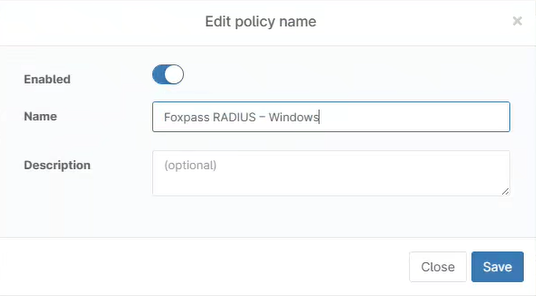
Administration > Policies > Agent Policies > Add Agent Policy
Configure the policy:
| Setting | Value |
|---|---|
| Name | Foxpass RADIUS - Windows |
| Role | Windows Desktops and Laptops |

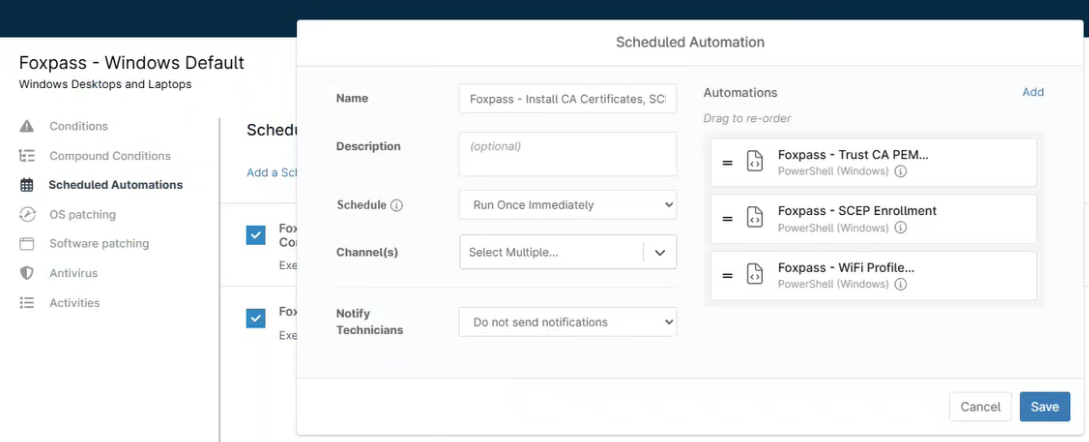
Scheduled Automation 1: Initial Deployment
Configure the schedule:
| Setting | Value |
|---|---|
| Name | Foxpass - Install CA Certificates, SCEP Enrollment, WiFi Profile |
| Schedule | Run Once Immediately |
Add these automations in order:
- Foxpass - Trust CA PEM Certificates
- Foxpass - SCEP Device Certificate Enrollment
- Foxpass - Wi-Fi Profile Configuration - SSID
Click Save.
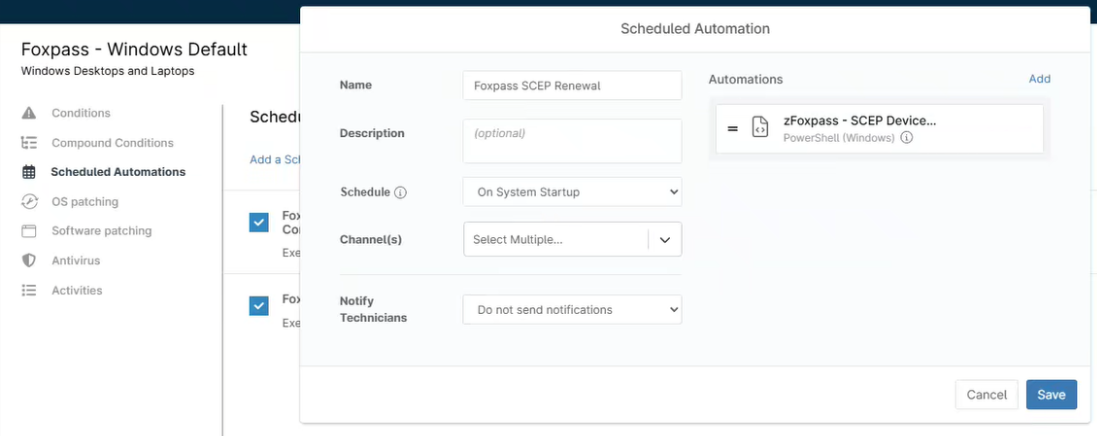
Scheduled Automation 2: SCEP Renewal
Configure the schedule:
| Setting | Value |
|---|---|
| Name | Foxpass - SCEP Renewal |
| Schedule | On System Startup |
Add this automation:
- Foxpass - SCEP Device Enrollment
Click Save.
Enable the policy
Enable the newly created policy.
Step 4: Review and Validate
After deployment, verify that the automations and certificates are present.
Check automation activity
Go to:
Organization > Activities > All
Confirm that the automations completed successfully.
Check installed certificates
Open certlm (Manage Computer Certificates) and verify the following certificates.
Trusted Root Certification
- Client CA
- Server CA
Personal
-
SCEP Client Certificate
- The machine's
{{SerialNumber}}should be present.
- The machine's
Updated 2 months ago