
Splashtop AEM SCEP Configuration (Windows) / EAP-TLS
This guide walks through configuring Foxpass SCEP with Splashtop AEM for Windows certificate enrollment and EAP-TLS Wi-Fi deployment.
Prerequisites
- Foxpass Console access (admin role-level)
- Splashtop Console (admin role-level) access with rights to: Scripts
- Target devices already enrolled into Splashtop, specifically devices for testing initial deployment
Step 1: Configure SCEP
Create the SCEP endpoint in Foxpass
-
Open the Foxpass Console SCEP page.
-
Click Create SCEP endpoint.
-
Configure the endpoint:
- Name: Give the endpoint a descriptive name, for example
Splashtop AEM SCEP. - Verification type:
NoneVerification type applicable to MDM enrollment.
- Authentication type:
Challenge Password - Client Certificate Authority: Use the CA created during the EAP-TLS Initial Setup.
- Name: Give the endpoint a descriptive name, for example
-
Click Create.
Before proceeding, make sure to download your:
Step 2: Configure Scripts & Tasks
Go to the Scripts & Tasks page in the Splashtop Web Console.
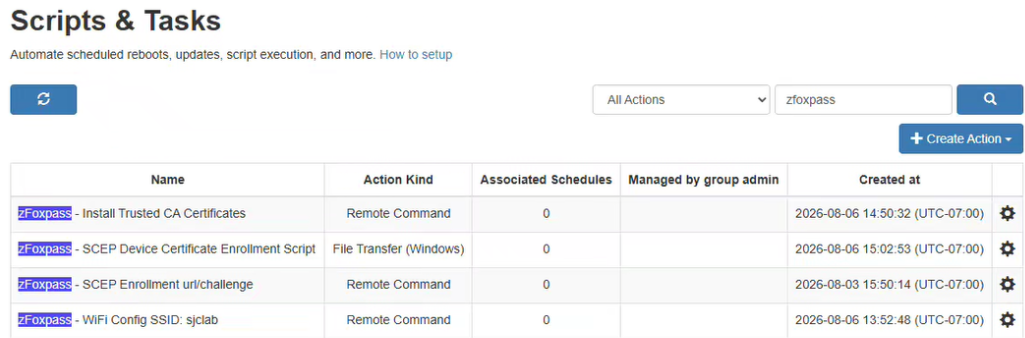
Four actions will be configured:
- Remote Command – Install Trusted CA Certificates
- File Transfer – SCEP Device Certificate Enrollment
- Remote Command – SCEP Enrollment URL/Challenge
- Remote Command – WiFi Configuration – SSID:
insert_ssid
Action 1: Install Trusted CA Certificates
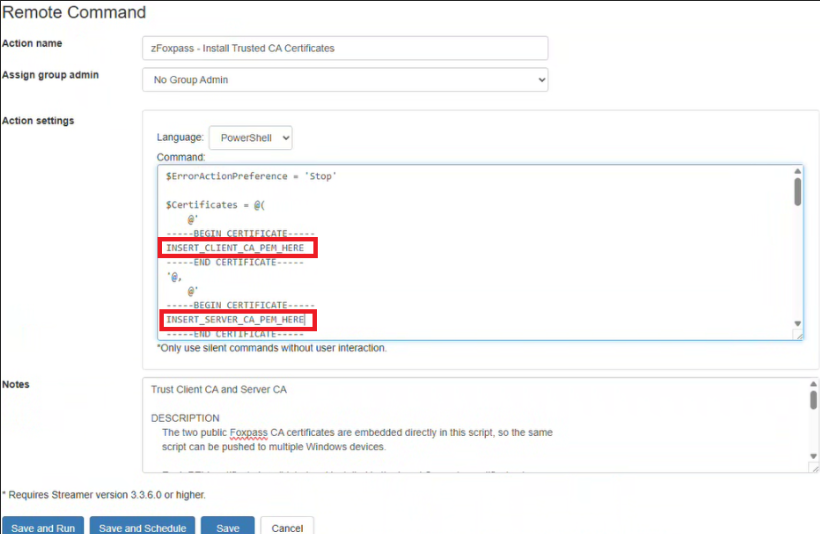
Create a new action and select Remote Command.
Configure the action:
| Setting | Value |
|---|---|
| Action Name | Foxpass - Install Trusted CA Certificates |
| Language | PowerShell |
Within the script, replace two values with the appropriate CA certificate PEM content.
To retrieve each certificate PEM:
- Locate the Client CA and Server CA certificate files.
- Right-click each certificate.
- Open the certificate with Notepad.
- Copy the PEM certificate content.
- Insert the corresponding PEM content into the script.
Install Trusted CA Certificate.ps1
$ErrorActionPreference = 'Stop'

# -----------------------------------------------------------------------------
# PASTE THE COMPLETE FOXPASS CA CERTIFICATES BELOW.
# Keep the BEGIN CERTIFICATE and END CERTIFICATE lines.
# Do not paste a client/device identity certificate or any private key.
# -----------------------------------------------------------------------------

$Certificates = @(
    @'
-----BEGIN CERTIFICATE-----
INSERT_CLIENT_CA_PEM_HERE
-----END CERTIFICATE-----
'@,
    @'
-----BEGIN CERTIFICATE-----
INSERT_SERVER_CA_PEM_HERE
-----END CERTIFICATE-----
'@
# -----------------------------------------------------------------------------

)

try {
    $admin = New-Object Security.Principal.WindowsPrincipal([Security.Principal.WindowsIdentity]::GetCurrent())
    if (-not $admin.IsInRole([Security.Principal.WindowsBuiltInRole]::Administrator)) { throw 'Run as SYSTEM or Administrator.' }

    $installed = 0
    $existing = 0

    foreach ($pem in $Certificates) {
        $base64 = ($pem -replace '-----BEGIN CERTIFICATE-----|-----END CERTIFICATE-----|\s','')
        $cert = New-Object Security.Cryptography.X509Certificates.X509Certificate2 -ArgumentList @(,[Convert]::FromBase64String($base64))

        try {
            $basicConstraints = $cert.Extensions | Where-Object { $_.Oid.Value -eq '2.5.29.19' } | Select-Object -First 1
            if (-not $basicConstraints) { throw "Certificate '$($cert.Subject)' is not marked as a CA." }

            $constraint = New-Object Security.Cryptography.X509Certificates.X509BasicConstraintsExtension
            $constraint.CopyFrom($basicConstraints)
            if (-not $constraint.CertificateAuthority) { throw "Certificate '$($cert.Subject)' is not marked as a CA." }

            $storeName = if ($cert.Subject -eq $cert.Issuer) { 'Root' } else { 'CA' }
            $store = New-Object Security.Cryptography.X509Certificates.X509Store($storeName,'LocalMachine')
            try {
                $store.Open('ReadWrite')
                if ($store.Certificates.Find('FindByThumbprint',$cert.Thumbprint,$false).Count) {
                    Write-Host "Already installed: $($cert.Subject)"
                    $existing++
                } else {
                    $store.Add($cert)
                    Write-Host "Installed: $($cert.Subject) -> LocalMachine\$storeName"
                    $installed++
                }
            } finally { $store.Close() }
        } finally { $cert.Dispose() }
    }

    Write-Host "Completed. Installed: $installed; already present: $existing."
    exit 0
} catch {
    Write-Error $_.Exception.Message
    exit 1
}
Click Save.
Action 2: SCEP Device Certificate Enrollment Script
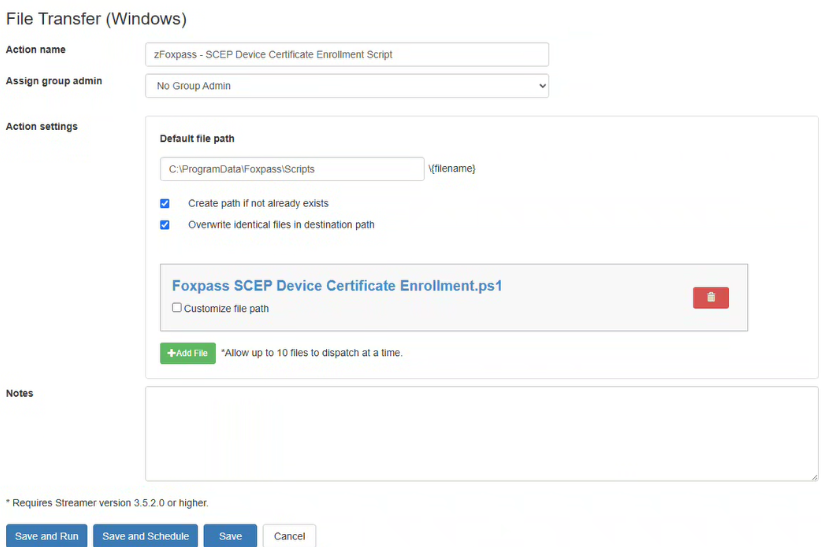
Create a new action and select File Transfer (Windows).
Configure the action:
| Setting | Value |
|---|---|
| Action Name | Foxpass - SCEP Device Certificate Enrollment Script |
| Default file path | C:\ProgramData\Foxpass\Scripts |
Optional settings:
- Create path if it doesn't already exist
- Overwrite identical files in destination path
SCEP Device Certificate Enrollment.ps1
Copy and save the script below as a .ps1 file.
Paste in Notepad and save file as .ps1
#requires -Version 5.1
[CmdletBinding()]
param(
    [string]$FoxpassScepEndpoint,
    [string]$FoxpassScepChallengePass,
    [string]$CertificateSubject,
    [ValidateRange(1,3650)][int]$RenewalDays = 30,
    [ValidateSet(2048,4096)][int]$KeyLength = 4096,
    [bool]$CleanupSupersededCertificates = $true,
    [string]$FriendlyName = 'Foxpass EAP-TLS Device Certificate',
    [string]$LogPath = 'C:\ProgramData\Foxpass\Logs\Enroll-FoxpassSCEP.log'
)

Set-StrictMode -Version 2.0
$ErrorActionPreference = 'Stop'
$ProgressPreference = 'SilentlyContinue'
$ClientAuthOid = '1.3.6.1.5.5.7.3.2'
$Sha256Oid = '2.16.840.1.101.3.4.2.1'
$StorePath = 'Cert:\LocalMachine\My'

function Write-Log {
    param([string]$Message,[ValidateSet('INFO','WARN','ERROR')][string]$Level='INFO')
    $dir = Split-Path -Parent $LogPath
    if (-not (Test-Path -LiteralPath $dir)) { New-Item -Path $dir -ItemType Directory -Force | Out-Null }
    $line = '{0} [{1}] {2}' -f (Get-Date -Format 'yyyy-MM-dd HH:mm:ss'),$Level,$Message
    Write-Host $line
    Add-Content -LiteralPath $LogPath -Value $line -Encoding UTF8
}

function ConvertTo-Text {
    param([AllowNull()][object]$Value)
    if ($null -eq $Value) { return $null }
    if ($Value -is [Security.SecureString]) {
        $ptr = [Runtime.InteropServices.Marshal]::SecureStringToBSTR($Value)
        try { $Value = [Runtime.InteropServices.Marshal]::PtrToStringBSTR($ptr) }
        finally { if ($ptr -ne [IntPtr]::Zero) { [Runtime.InteropServices.Marshal]::ZeroFreeBSTR($ptr) } }
    }
    if ($Value -is [Array]) { $Value = @($Value | ForEach-Object { ConvertTo-Text $_ } | Where-Object { $_ }) -join [Environment]::NewLine }
    $text = [Convert]::ToString($Value,[Globalization.CultureInfo]::InvariantCulture).Trim()
    if ($text) { return $text }
    return $null
}

function Resolve-Value {
    param([AllowNull()][object]$Explicit,[string]$EnvironmentName,[switch]$Required)
    $value = ConvertTo-Text $Explicit
    if (-not $value) { $value = ConvertTo-Text ([Environment]::GetEnvironmentVariable($EnvironmentName,'Process')) }
    if ($Required -and -not $value) { throw "Missing '$EnvironmentName'. Supply it as a parameter or process environment variable." }
    return $value
}

function Get-ClientAuthOids {
    param([Security.Cryptography.X509Certificates.X509Certificate2]$Certificate)
    $ext = $Certificate.Extensions | Where-Object { $_.Oid.Value -eq '2.5.29.37' } | Select-Object -First 1
    if (-not $ext) { return @() }
    try {
        $eku = New-Object Security.Cryptography.X509Certificates.X509EnhancedKeyUsageExtension
        $eku.CopyFrom($ext)
        return @($eku.EnhancedKeyUsages | ForEach-Object Value)
    }
    catch {
        return @($Certificate.EnhancedKeyUsageList | ForEach-Object {
            if ($_.ObjectId -is [string]) { $_.ObjectId } elseif ($_.ObjectId) { $_.ObjectId.Value }
        })
    }
}

function Get-MatchingCertificates {
    param([string]$Subject)
    @(Get-ChildItem $StorePath | Where-Object {
        $_.Subject -ieq $Subject -and $_.HasPrivateKey -and ((Get-ClientAuthOids $_) -contains $ClientAuthOid)
    })
}

function New-ScepRequest {
    param([string]$Subject,[string]$Challenge,[int]$Length)
    $request = New-Object -ComObject X509Enrollment.CX509CertificateRequestPkcs10
    $request.Initialize(2)
    $dn = New-Object -ComObject X509Enrollment.CX500DistinguishedName
    $dn.Encode($Subject)
    $request.Subject = $dn
    $request.PrivateKey.Length = $Length
    $request.PrivateKey.ExportPolicy = 0
    $request.PrivateKey.ProviderName = 'Microsoft Software Key Storage Provider'
    $request.KeyContainerNamePrefix = "FoxpassSCEP-$($env:COMPUTERNAME)-"
    $request.ChallengePassword = $Challenge
    $hash = New-Object -ComObject X509Enrollment.CObjectId
    $hash.InitializeFromValue($Sha256Oid)
    $request.HashAlgorithm = $hash
    $keyUsage = New-Object -ComObject X509Enrollment.CX509ExtensionKeyUsage
    $keyUsage.InitializeEncode(0xA0)
    $request.X509Extensions.Add($keyUsage)
    $oids = New-Object -ComObject X509Enrollment.CObjectIds
    $oid = New-Object -ComObject X509Enrollment.CObjectId
    $oid.InitializeFromValue($ClientAuthOid)
    $oids.Add($oid)
    $eku = New-Object -ComObject X509Enrollment.CX509ExtensionEnhancedKeyUsage
    $eku.InitializeEncode($oids)
    $request.X509Extensions.Add($eku)
    return $request
}

function Invoke-ScepEnrollment {
    param([string]$Endpoint,[__ComObject]$Request)
    $helper = New-Object -ComObject X509Enrollment.CX509SCEPEnrollmentHelper
    $helper.Initialize($Endpoint,[string]::Empty,$Request,[string]::Empty)
    $result = [int]$helper.Enroll(0)
    if ($result -eq 0) { return }
    $message = [string]$helper.ResultMessageText
    switch ($result) {
        2 { throw "Foxpass rejected the request. $message" }
        3 { throw "Foxpass returned a pending response. $message" }
        11 { throw "Foxpass requested another challenge. $message" }
        default { throw "Unexpected SCEP disposition '$result'. $message" }
    }
}

try {
    $identity = [Security.Principal.WindowsIdentity]::GetCurrent()
    $principal = New-Object Security.Principal.WindowsPrincipal($identity)
    if (-not $principal.IsInRole([Security.Principal.WindowsBuiltInRole]::Administrator)) { throw 'Run this script from an elevated 64-bit Windows PowerShell session.' }

    $FoxpassScepEndpoint = Resolve-Value $FoxpassScepEndpoint 'FoxpassScepEndpoint' -Required
    $match = [regex]::Match([Net.WebUtility]::HtmlDecode($FoxpassScepEndpoint),'https://api\.foxpass\.com/scep/[A-Za-z0-9-]+/?','IgnoreCase')
    if ($match.Success) { $FoxpassScepEndpoint = $match.Value }
    $uri = $null
    if (-not [Uri]::TryCreate($FoxpassScepEndpoint,[UriKind]::Absolute,[ref]$uri) -or $uri.Scheme -ne 'https') { throw 'Invalid Foxpass SCEP HTTPS endpoint.' }
    $FoxpassScepEndpoint = $uri.AbsoluteUri

    $FoxpassScepChallengePass = [Net.WebUtility]::HtmlDecode((Resolve-Value $FoxpassScepChallengePass 'FoxpassScepChallengePass' -Required))
    $FoxpassScepChallengePass = ($FoxpassScepChallengePass -replace '[\uFEFF\u200B-\u200D\u2060\x00-\x1F\x7F]','').Trim().Trim([char[]]@([char]34,[char]39))
    if (-not $FoxpassScepChallengePass -or $FoxpassScepChallengePass -match '[^\x20-\x7E]') { throw 'Invalid Foxpass SCEP challenge.' }

    $serial = ConvertTo-Text (Get-CimInstance Win32_BIOS -ErrorAction Stop).SerialNumber
    if (-not $serial -or $serial -in @('Default String','System Serial Number','To Be Filled By O.E.M.','To Be Filled By OEM','Unknown','None','Not Specified','Not Applicable')) { throw "Invalid BIOS serial number: '$serial'." }
    $serial = ($serial -replace '[\uFEFF\u200B-\u200D\u2060\x00-\x1F\x7F]','' -replace '\\','\\' -replace '([,+"<>;=])','\$1').Trim()

    if (-not $CertificateSubject) { $CertificateSubject = Resolve-Value $null 'FoxpassCertificateSubject' }
    if (-not $CertificateSubject) { $CertificateSubject = "CN=$serial" }
    else {
        foreach ($token in '{{SerialNumber}}','{{SERIALNUMBER}}','%SERIALNUMBER%','$serialNumber') { $CertificateSubject = $CertificateSubject.Replace($token,$serial) }
        if ($CertificateSubject -notmatch '^\s*[A-Za-z][A-Za-z0-9.]*\s*=') { $CertificateSubject = "CN=$CertificateSubject" }
    }

    if ($raw = Resolve-Value $null 'FoxpassRenewalDays') {
        $parsed = 0
        if (-not [int]::TryParse($raw,[ref]$parsed) -or $parsed -lt 1 -or $parsed -gt 3650) { throw 'FoxpassRenewalDays must be 1-3650.' }
        $RenewalDays = $parsed
    }

    $existing = Get-MatchingCertificates $CertificateSubject | Where-Object { $_.NotBefore -le (Get-Date) -and $_.NotAfter -gt (Get-Date) } | Sort-Object NotAfter -Descending | Select-Object -First 1
    if ($existing -and $existing.NotAfter -gt (Get-Date).AddDays($RenewalDays)) {
        Write-Log "Certificate valid until $($existing.NotAfter.ToString('u')); no renewal needed."
        exit 0
    }

    Write-Log "Enrolling $CertificateSubject."
    $before = @(Get-ChildItem $StorePath | ForEach-Object Thumbprint)
    $request = New-ScepRequest $CertificateSubject $FoxpassScepChallengePass $KeyLength
    Invoke-ScepEnrollment $FoxpassScepEndpoint $request
    $FoxpassScepChallengePass = $null

    $newCertificate = $null
    for ($i=0; $i -lt 5 -and -not $newCertificate; $i++) {
        Start-Sleep 2
        $newCertificate = Get-MatchingCertificates $CertificateSubject | Where-Object { $before -notcontains $_.Thumbprint } | Sort-Object NotAfter -Descending | Select-Object -First 1
    }
    if (-not $newCertificate) { throw 'SCEP completed, but no usable new client-authentication certificate was found.' }

    try { $newCertificate.FriendlyName = $FriendlyName } catch { Write-Log 'Certificate installed; friendly name could not be set.' 'WARN' }
    if ($CleanupSupersededCertificates) {
        Get-MatchingCertificates $CertificateSubject | Where-Object {
            $_.Thumbprint -ne $newCertificate.Thumbprint -and $_.NotAfter -le $newCertificate.NotAfter
        } | ForEach-Object {
            try { Remove-Item (Join-Path $StorePath $_.Thumbprint) -Force } catch { Write-Log "Could not remove old certificate $($_.Thumbprint)." 'WARN' }
        }
    }

    Write-Log "Enrollment complete: $($newCertificate.Thumbprint), expires $($newCertificate.NotAfter.ToString('u'))."
    exit 0
}
catch {
    Write-Log $_.Exception.Message 'ERROR'
    exit 1
}
finally {
    $FoxpassScepChallengePass = $null
    $request = $null
}
Under Add File, add the SCEP Device Certificate Enrollment.ps1 script.
Click Save.
Action 3: SCEP Enrollment URL/Challenge
Create a new action and select Remote Command.
Configure the action:
| Setting | Value |
|---|---|
| Action Name | Foxpass - SCEP Enrollment URL/Challenge |
| Language | PowerShell |
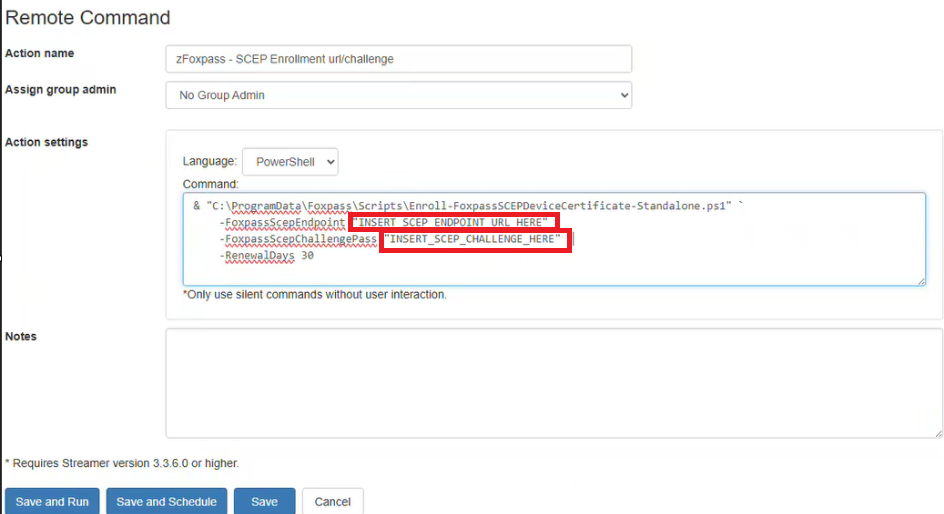
SCEP Enrollment URL/Challenge.ps1
& "C:\ProgramData\Foxpass\Scripts\SCEP Device Certificate Enrollment.ps1" `
    -FoxpassScepEndpoint "INSERT_SCEP_ENDPOINT_URL_HERE" `
    -FoxpassScepChallengePass "INSERT_CHALLENGE_HERE" `
    -RenewalDays 30
Copy the contents, and paste them into the Command field.
Within the script, replace two values:
- SCEP Endpoint URL
- SCEP Challenge Password
Retrieve both values from the Foxpass SCEP page using the SCEP endpoint created in Step 1.
This will be a recurring action.
Click Save.
Action 4: Wi-Fi Configuration
Create a new action and select Remote Command.
Configure the action:
| Setting | Value |
|---|---|
| Action Name | Foxpass - WiFi Configuration - SSID |
| Language | PowerShell |
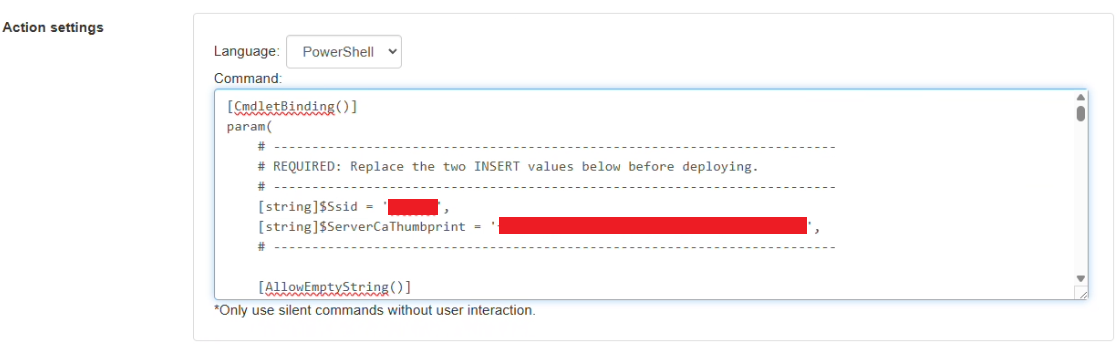
Copy the contents, and paste them into the Command field.
Within the script, replace the following two values.
1. SSID
Replace:
$Ssid = 'INSERT_SSID_HERE'Note: The SSID is case-sensitive.
2. Server CA Thumbprint
Replace the Server CA thumbprint value:
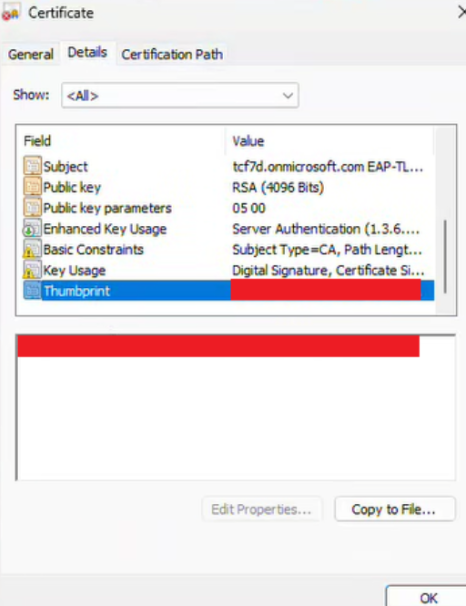
$ServerCaThumbprint = 'INSERT_SERVER_CA_THUMBPRINT_HERE'To retrieve the thumbprint:
- Open the Server CA Certificate.
- Select the Details tab.
- Locate Thumbprint.
- Copy the thumbprint value into the script.
WiFi Profile Configuration.ps1
[CmdletBinding()]
param(
    # -------------------------------------------------------------------------
    # REQUIRED: Replace the two INSERT values below before deploying.
    # -------------------------------------------------------------------------
    [string]$Ssid = 'INSERT_SSID_HERE',
    [string]$ServerCaThumbprint = 'INSERT_SERVER_CA_THUMBPRINT_HERE',
    # -------------------------------------------------------------------------

    [AllowEmptyString()]
    [string]$RadiusServerNames = '',

    [ValidateRange(10,300)]
    [int]$ConnectionWaitSeconds = 60,

    [switch]$RequireImmediateConnection,

    [string]$LogPath = "C:\ProgramData\Foxpass\Logs\Configure-$Ssid-EAPTLS.log"
)

Set-StrictMode -Version 2.0
$ErrorActionPreference = 'Stop'
$ProgressPreference = 'SilentlyContinue'

$ClientAuthenticationOid = '1.3.6.1.5.5.7.3.2'

function Initialize-Log {
    $directory = Split-Path -Parent $LogPath
    if (-not (Test-Path -LiteralPath $directory)) {
        New-Item -Path $directory -ItemType Directory -Force | Out-Null
    }
}

function Write-Log {
    param(
        [Parameter(Mandatory)]
        [string]$Message,

        [ValidateSet('INFO','WARN','ERROR')]
        [string]$Level = 'INFO'
    )

    $entry = '{0} [{1}] {2}' -f (Get-Date -Format 'yyyy-MM-dd HH:mm:ss'), $Level, $Message
    Write-Host $entry
    Add-Content -LiteralPath $LogPath -Value $entry -Encoding UTF8
}

function Test-IsAdministrator {
    $identity = [Security.Principal.WindowsIdentity]::GetCurrent()
    $principal = New-Object Security.Principal.WindowsPrincipal($identity)
    return $principal.IsInRole([Security.Principal.WindowsBuiltInRole]::Administrator)
}

function Normalize-Thumbprint {
    param([Parameter(Mandatory)][string]$Thumbprint)

    $normalized = ($Thumbprint -replace '[^0-9A-Fa-f]', '').ToUpperInvariant()
    if ($normalized.Length -ne 40) {
        throw 'Server CA thumbprint must be a 40-character SHA-1 certificate thumbprint.'
    }

    return $normalized
}

function Test-ClientAuthenticationEku {
    param(
        [Parameter(Mandatory)]
        [Security.Cryptography.X509Certificates.X509Certificate2]$Certificate
    )

    try {
        foreach ($usage in @($Certificate.EnhancedKeyUsageList)) {
            if ($null -eq $usage) { continue }

            $oid = $null
            if ($usage.PSObject.Properties.Name -contains 'ObjectId') {
                $objectId = $usage.ObjectId
                if ($objectId -is [string]) {
                    $oid = $objectId
                }
                elseif ($null -ne $objectId -and $objectId.PSObject.Properties.Name -contains 'Value') {
                    $oid = [string]$objectId.Value
                }
            }

            if ([string]::IsNullOrWhiteSpace($oid) -and $usage -is [Security.Cryptography.Oid]) {
                $oid = [string]$usage.Value
            }

            if ($oid -eq $ClientAuthenticationOid) {
                return $true
            }
        }
    }
    catch {
        # Fall through to direct EKU extension parsing.
    }

    try {
        $ekuExtension = $Certificate.Extensions |
            Where-Object { $_.Oid.Value -eq '2.5.29.37' } |
            Select-Object -First 1

        if ($null -eq $ekuExtension) {
            return $false
        }

        $typedEku = New-Object -TypeName Security.Cryptography.X509Certificates.X509EnhancedKeyUsageExtension -ArgumentList @($ekuExtension, $ekuExtension.Critical)

        foreach ($oid in @($typedEku.EnhancedKeyUsages)) {
            if ($null -ne $oid -and [string]$oid.Value -eq $ClientAuthenticationOid) {
                return $true
            }
        }
    }
    catch {
        return $false
    }

    return $false
}

function Escape-XmlText {
    param(
        [AllowNull()]
        [AllowEmptyString()]
        [string]$Text
    )

    if ([string]::IsNullOrEmpty($Text)) {
        return ''
    }

    return [Security.SecurityElement]::Escape($Text)
}

Initialize-Log
Write-Log "Deploying EAP-TLS profile for '$Ssid'."

try {
    if (-not (Test-IsAdministrator)) {
        throw 'This script must run as Administrator or SYSTEM.'
    }

    if (-not [Environment]::Is64BitProcess) {
        throw 'Run this script from 64-bit Windows PowerShell.'
    }

    $ServerCaThumbprint = Normalize-Thumbprint -Thumbprint $ServerCaThumbprint
    $ServerCaThumbprintXml = ($ServerCaThumbprint -replace '(..)', '$1 ').Trim()

    if ([string]::IsNullOrWhiteSpace($RadiusServerNames)) {
        $RadiusServerNames = ''
        Write-Log 'Server-name matching disabled; CA pinning remains enabled.' 'WARN'
    }

    $serverCa = Get-ChildItem Cert:\LocalMachine\Root, Cert:\LocalMachine\CA -ErrorAction SilentlyContinue |
        Where-Object {
            ($_.Thumbprint -replace '\s', '').ToUpperInvariant() -eq $ServerCaThumbprint
        } |
        Select-Object -First 1

    if (-not $serverCa) {
        throw "The Foxpass Server CA certificate '$ServerCaThumbprint' is not installed in LocalMachine\Root or LocalMachine\CA."
    }

    $serial = [string](Get-CimInstance -ClassName Win32_BIOS -ErrorAction Stop).SerialNumber
    $serial = $serial.Trim()
    if ([string]::IsNullOrWhiteSpace($serial)) {
        throw 'The machine BIOS serial number could not be determined.'
    }

    $expectedSubject = "CN=$serial"
    $clientCert = Get-ChildItem Cert:\LocalMachine\My |
        Where-Object {
            $_.Subject -eq $expectedSubject -and
            $_.HasPrivateKey -and
            $_.NotAfter -gt (Get-Date) -and
            (Test-ClientAuthenticationEku -Certificate $_)
        } |
        Sort-Object NotAfter -Descending |
        Select-Object -First 1

    if (-not $clientCert) {
        throw "No valid machine EAP-TLS certificate with subject '$expectedSubject', private key, and Client Authentication EKU was found."
    }

    Write-Log "Client certificate ready: $expectedSubject."

    $wlanService = Get-Service -Name WlanSvc -ErrorAction Stop
    if ($wlanService.Status -ne 'Running') {
        Start-Service -Name WlanSvc
        $wlanService.WaitForStatus('Running', [TimeSpan]::FromSeconds(15))
    }

    $interfacesText = (& netsh.exe wlan show interfaces 2>&1 | Out-String)
    if ($LASTEXITCODE -ne 0 -or $interfacesText -match 'There is no wireless interface') {
        throw 'No usable Windows wireless interface was detected.'
    }

    $escapedSsid = Escape-XmlText -Text $Ssid
    $normalizedServerNames = @(
        $RadiusServerNames -split '[,;\r\n]+' |
            ForEach-Object { $_.Trim() } |
            Where-Object { -not [string]::IsNullOrWhiteSpace($_) }
    ) -join ';'
    $escapedServerNames = Escape-XmlText -Text $normalizedServerNames

    $profileXml = @"
<?xml version="1.0" encoding="UTF-8"?>
<WLANProfile xmlns="http://www.microsoft.com/networking/WLAN/profile/v1">
  <name>$escapedSsid</name>
  <SSIDConfig>
    <SSID><name>$escapedSsid</name></SSID>
    <nonBroadcast>false</nonBroadcast>
  </SSIDConfig>
  <connectionType>ESS</connectionType>
  <connectionMode>auto</connectionMode>
  <autoSwitch>false</autoSwitch>
  <MSM>
    <security>
      <authEncryption>
        <authentication>WPA2</authentication>
        <encryption>AES</encryption>
        <useOneX>true</useOneX>
      </authEncryption>
      <OneX xmlns="http://www.microsoft.com/networking/OneX/v1">
        <authMode>machine</authMode>
        <EAPConfig>
          <EapHostConfig xmlns="http://www.microsoft.com/provisioning/EapHostConfig" xmlns:eapCommon="http://www.microsoft.com/provisioning/EapCommon" xmlns:baseEap="http://www.microsoft.com/provisioning/BaseEapMethodConfig">
            <EapMethod>
              <eapCommon:Type>13</eapCommon:Type>
              <eapCommon:AuthorId>0</eapCommon:AuthorId>
            </EapMethod>
            <Config xmlns:baseEap="http://www.microsoft.com/provisioning/BaseEapConnectionPropertiesV1" xmlns:eapTls="http://www.microsoft.com/provisioning/EapTlsConnectionPropertiesV1">
              <baseEap:Eap>
                <baseEap:Type>13</baseEap:Type>
                <eapTls:EapType>
                  <eapTls:CredentialsSource>
                    <eapTls:CertificateStore>
                      <eapTls:SimpleCertSelection>true</eapTls:SimpleCertSelection>
                    </eapTls:CertificateStore>
                  </eapTls:CredentialsSource>
                  <eapTls:ServerValidation>
                    <eapTls:DisableUserPromptForServerValidation>true</eapTls:DisableUserPromptForServerValidation>
                    <eapTls:ServerNames>$escapedServerNames</eapTls:ServerNames>
                    <eapTls:TrustedRootCA>$ServerCaThumbprintXml</eapTls:TrustedRootCA>
                  </eapTls:ServerValidation>
                  <eapTls:DifferentUsername>false</eapTls:DifferentUsername>
                  <eapTlsV2:PerformServerValidation xmlns:eapTlsV2="http://www.microsoft.com/provisioning/EapTlsConnectionPropertiesV2">true</eapTlsV2:PerformServerValidation>
                  <eapTlsV2:AcceptServerName xmlns:eapTlsV2="http://www.microsoft.com/provisioning/EapTlsConnectionPropertiesV2">false</eapTlsV2:AcceptServerName>
                </eapTls:EapType>
              </baseEap:Eap>
            </Config>
          </EapHostConfig>
        </EAPConfig>
      </OneX>
    </security>
  </MSM>
</WLANProfile>
"@

    $tempPath = Join-Path $env:TEMP ("{0}-EAPTLS.xml" -f $Ssid)
    try {
        Set-Content -LiteralPath $tempPath -Value $profileXml -Encoding UTF8 -Force
        $addOutput = (& netsh.exe wlan add profile filename="$tempPath" user=all 2>&1 | Out-String).Trim()
        if ($LASTEXITCODE -ne 0) {
            throw "Windows failed to import the '$Ssid' profile. $addOutput"
        }
        Write-Log "Profile installed: $Ssid."
    }
    finally {
        Remove-Item -LiteralPath $tempPath -Force -ErrorAction SilentlyContinue
    }

    $networks = (& netsh.exe wlan show networks mode=bssid 2>&1 | Out-String)
    if ($networks -notmatch ('(?im)^\s*SSID\s+\d+\s*:\s*' + [regex]::Escape($Ssid) + '\s*$')) {
        Write-Log "SSID '$Ssid' is not visible; the profile will auto-connect when available." 'WARN'
        exit 0
    }

    $connectOutput = (& netsh.exe wlan connect name="$Ssid" ssid="$Ssid" 2>&1 | Out-String).Trim()
    if ($LASTEXITCODE -ne 0) {
        throw "Windows could not start the connection to '$Ssid'. $connectOutput"
    }

    Write-Log "Connection requested: $Ssid."

    $deadline = (Get-Date).AddSeconds($ConnectionWaitSeconds)
    do {
        Start-Sleep -Seconds 2
        $status = (& netsh.exe wlan show interfaces 2>&1 | Out-String)
        if ($status -match '(?im)^\s*State\s*:\s*connected\s*$' -and
            $status -match ('(?im)^\s*SSID\s*:\s*' + [regex]::Escape($Ssid) + '\s*$')) {
            Write-Log "Connected: $Ssid."
            exit 0
        }
    } while ((Get-Date) -lt $deadline)

    if ($RequireImmediateConnection) {
        throw "The '$Ssid' connection did not reach the connected state within $ConnectionWaitSeconds seconds."
    }

    Write-Log "Profile installed, but Windows did not connect within $ConnectionWaitSeconds seconds." 'WARN'
    exit 0
}
catch {
    Write-Log $_.Exception.Message 'ERROR'
    if ($_.InvocationInfo.ScriptLineNumber) {
        Write-Log "Line $($_.InvocationInfo.ScriptLineNumber)." 'ERROR'
    }
    exit 1
}
Click Save.
Run the Actions
Once all four actions have been saved, run each action one at a time to confirm that it completes successfully.
Recommended: Test the deployment on a small set of Windows devices before deploying it broadly.
Run the actions in the following order:
1. Install Trusted CA Certificates
Action: Remote Command – Install Trusted CA Certificates
This installs the following certificates into the Windows Root Certificate Store:
- Client CA
- Server CA
2. Transfer the SCEP Device Certificate Enrollment Script
Action: File Transfer – SCEP Device Certificate Enrollment
This transfers the .ps1 enrollment script to the configured folder so it can be executed by the next action.
3. Run SCEP Enrollment
Action: Remote Command – SCEP Enrollment URL/Challenge
This enrolls the device using the Foxpass SCEP endpoint and generates a device client certificate associated with the device's {{SerialNumber}}.
Run this action daily or weekly for automated certificate renewal.
4. Configure Wi-Fi
Action: Remote Command – WiFi Configuration – SSID
This configures the device to connect to the assigned WPA2/WPA3 Enterprise SSID using 802.1X authentication.
Step 4: Review and Validate
If all actions complete successfully, the device should already be connected to the assigned SSID.
Check Installed Certificates
Open certlm (Manage Computer Certificates) and verify that the expected certificates are installed.
Trusted Root Certification
Verify the following certificates are present:
- Client CA
- Server CA
Personal
Verify the following certificate is present:
-
SCEP Client Certificate
- The machine's
{{SerialNumber}}should be present in the certificate.
- The machine's
Deployment Checklist
Before considering deployment complete, verify that:
- The Foxpass SCEP endpoint has been created.
- The Client CA and Server CA certificates have been downloaded.
- All four Splashtop AEM actions have been created.
- The Client CA and Server CA are installed on the device.
- The SCEP enrollment script has been transferred to the device.
- SCEP enrollment completes successfully.
- SCEP Logs can be checked.
- The SCEP client certificate contains the machine's
{{SerialNumber}}. - The Wi-Fi profile has been configured.
- The Windows device connects successfully to the assigned WPA2/WPA3 Enterprise SSID.
- RADIUS Logs can be checked.
Updated 2 months ago